Roofing service area pages are pages on your website for the individual towns or cities you work in, such as “Roof Replacement in [Town]”. Done well, each one shows homeowners in that town that you really work there, with local projects, photos, reviews and details that only apply to that area. Done badly, they are the same page copied twenty times with the town name swapped, and they rarely rank. This guide covers how many service area pages a roofer needs, what to put on each one, and how to tell a page that works from one that just fills space.
Key takeaways
- A service area page earns its place when it has local proof: real jobs, photos and reviews from that town.
- Copy-paste town pages with only the name changed are the pages most roofers have, and the ones that rarely rank. Google’s spam policies name pages aimed at specific cities that funnel visitors to one page as an example of doorway abuse.
- Start with your 5 to 10 highest-value towns, not every town within driving distance.
- Add a new town page only when you have enough real local content to make it useful.
- Service area pages support your Google Business Profile and local SEO. They do not replace either.
In this guide
What is a roofing service area page?
A service area page is a page on your website for one town, city or area you serve. It answers the question a homeowner has when they land on it: does this roofer actually work here, and have they done jobs like mine nearby?
It is different from your service pages. A service page explains a job, such as roof replacement or storm damage repair. A service area page explains your work in one place: the jobs you have done there, the common roof problems in that area, how quickly you can get there and what local homeowners say about you.
Most roofers are service-area businesses. You travel to the customer, so you want to show up for searches across many nearby towns, not just the one where your office is. Service area pages are one of the main ways your website supports that.
Why do most roofing town pages never rank?
Most roofing websites have town pages that were made in an afternoon: one template, twenty copies, a different town name in each heading. They look like local SEO, but they give Google and homeowners nothing new on each page.
Google’s spam policies on doorway abuse describe this pattern. One of the examples Google lists is having pages targeted at specific regions or cities that funnel users to one page. Another is creating substantially similar pages that are closer to search results than a clear, browsable site structure.
In plain terms, if your “Roofing in Town A” and “Roofing in Town B” pages say the same thing, Google has little reason to rank either one, and a homeowner who reads one learns nothing about your work in their town.
What does a good service area page look like next to a thin one?
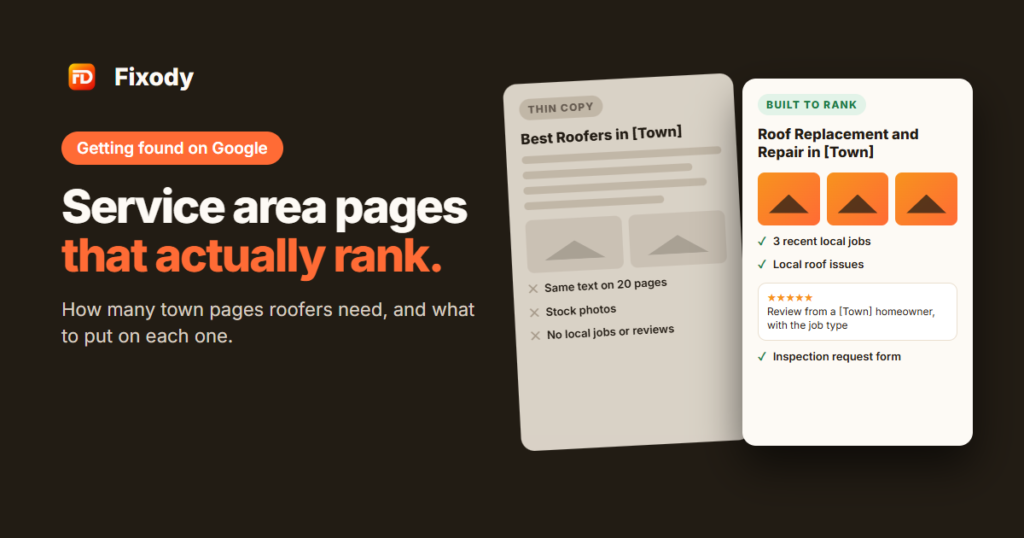
Here is the difference between a page that helps a homeowner and a page that only swaps the town name. The examples use Example Roofing Co. and a placeholder town.
| Part of the page | Thin copy-paste page | Good service area page |
|---|---|---|
| Heading | “Best Roofers in [Town]” | “Roof Replacement and Repair in [Town]” |
| Opening | Generic text used on every page, town name swapped in | A few lines on the work you do in [Town] and how long you have served it |
| Projects | None, or the same stock photos on every page | Two or three recent jobs in [Town] with real photos and a short note on the problem and the fix |
| Reviews | The same three reviews on every page | Reviews from homeowners in [Town] or nearby, with the job type |
| Local detail | None | Common roof types and problems in the area, such as older homes, hail exposure or HOA rules |
| Practical details | None | Neighborhoods covered, typical time to get an inspector out, any local permit notes you know to be accurate |
| Next step | “Contact us” | A clear way to call or request an inspection, with a short form |
The good page takes longer to build, but every part of it is true for that town only. That is what makes it worth ranking and worth reading.
How many service area pages does a roofer need?
Fewer than most think. Start with your 5 to 10 highest-value towns, build those properly, and add more only when you have real local content for them.
To choose the first towns, look at your own job history:
| Question | Why it matters |
|---|---|
| Where have you done the most jobs? | More jobs means more photos, reviews and projects to show |
| Where are your best-margin jobs? | Pages should target the work you most want more of |
| Where do your crews already drive? | Short drive times keep jobs profitable and response times fast |
| Where do you not show up on Google yet? | Towns where you work but do not rank have the most to gain |
| Where do storms hit most often? | Storm-prone towns bring repeat inspection and replacement work |
Keep the overall area realistic. Google’s guidance for Business Profile service areas allows up to 20 service areas and says the overall area should not extend beyond about 2 hours of driving time from where the business is based. Your website does not have to follow the same limit, but it is a useful check: a page for a town you would never drive to is not worth building.
What should you put on each service area page?
Use the same structure on every page, but fill each section with content that is specific to that town:
- A clear heading. The main service and the town, such as “Roof Replacement and Repair in [Town]”.
- A short local opening. Two or three sentences on the work you do there and how long you have served the area.
- Recent local projects. Two or three jobs with real photos, the roof type, the problem and what you did. This is the most important section.
- Local reviews. Reviews from homeowners in that town or the next one over, with their first name and the job type.
- Local roof issues. What you see often in that area: age of homes, common roofing materials, hail or wind exposure, ice dams, HOA approval. Only include what you know to be true.
- Services offered there. A short list linking to your main service pages.
- Neighborhoods and nearby towns. A plain list of the areas around it that you also cover.
- A clear call to action. A phone number, a short inspection request form and what happens next.
- A short FAQ. Two or three questions homeowners in that town really ask you.
If you cannot fill sections 3 to 5 for a town yet, that town is not ready for its own page. List it on a general “Areas we serve” page instead, and build the full page once you have a few jobs there.
How should roofers organise and link service area pages?
Keep the structure simple so both homeowners and Google can find every page:
- An “Areas we serve” hub page that lists every town you cover and links to each full town page.
- Clean URLs, such as /service-areas/[town]/, the same pattern for every page.
- Links between related pages: each town page links to the services it mentions, and your main service pages link back to the town pages where you do that work.
- Links from your footer or menu to the hub page, so it is easy to reach from anywhere on the site.
- Consistent business details: the same business name and phone number on every page, matching your Google Business Profile.
Service area pages work best on a site that is already fast, mobile-friendly and built to turn visits into quote requests. If your site is not there yet, our roofing websites service builds that base. Our local SEO service plans and writes the service area pages themselves, and both are part of our roofing marketing programs.
Where to start this week
- List every town page on your site and mark the ones that are copy-paste versions of each other.
- Pull your job list for the last 12 to 24 months and count jobs by town.
- Pick the 5 to 10 towns with the most jobs and the best margins.
- For the first town, gather three recent job photos, two or three reviews and a few notes on the local roofs.
- Rewrite that one page using the structure above, then repeat for the next town.
- For thin pages on towns you rarely work in, merge them into your “Areas we serve” page and redirect the old URLs.
One strong page a week is a realistic pace. Within two or three months you will have a set of town pages that are actually worth ranking.
Frequently asked questions
What are roofing service area pages?
They are pages on a roofer’s website for the individual towns or cities they serve. Each one shows the work done in that area, with local projects, photos and reviews, so homeowners there can see the company really works nearby.
How many service area pages should a roofing company have?
Start with your 5 to 10 highest-value towns and build them properly. Add more only when you have real local jobs, photos and reviews to put on each new page.
Are city pages bad for SEO?
Not on their own. The problem is near-identical pages with only the town name changed. Google’s spam policies describe pages aimed at specific cities that funnel visitors to one page as doorway abuse. Pages with real local content are a different thing.
Can I use the same template for every town page?
You can use the same structure, but the content in each section should be specific to that town: different projects, photos, reviews and local details.
Should I make pages for towns where I have no jobs yet?
Usually not. List those towns on a general “Areas we serve” page and build a full page once you have a few jobs, photos and reviews from there.
Do service area pages help me rank on Google Maps?
They can support it. Your website is one of the signals behind your Google Business Profile, and strong local pages help Google understand where you work. Map rankings still depend mostly on your profile, reviews and distance.
What should I do with old copy-paste town pages?
Rewrite the ones for your most important towns with real local content. Merge the rest into a single “Areas we serve” page and redirect the old URLs to it.
Sources
- Google Search Central: Spam policies for Google web search (doorway abuse)
- Google Business Profile Help: Manage your service areas for service-area and hybrid businesses
Are your town pages helping or just taking up space?
The free lead-leak report checks your website, Google Business Profile, reviews and response time, and shows you which fixes will bring in the most jobs first.